
Where to Go from Here
Last updated on 2026-09-29 | Edit this page
Estimated time: 40 minutes
Overview
Questions
- Where do I find help when I get stuck?
- What resources are available for continued learning?
- How do I access Dutch Caribbean data directly from R?
Objectives
- Know where to find help: documentation, community forums, Stack Overflow
- Access Dutch Caribbean data using R packages (cbsodataR, WDI)
- Build a personal library of R scripts that replace SPSS workflows
- Understand the Carpentries community and further learning paths

Getting help
Everyone gets stuck. The difference between a beginner and an experienced R user is not that experienced users never see errors — it is that they know where to look when they do. Here are the most useful help resources, in order of how quickly they give you an answer.
Built-in documentation
Every R function has a help page. Access it in two ways:
R
# These two are equivalent:
?mean
help("mean")
The help page shows what arguments the function takes, what it returns, and usually includes examples at the bottom. The examples are often the most useful part — scroll down to them first.
Tip: run the examples
At the bottom of most help pages there is an “Examples” section. You can run all of them at once with:
R
example(mean)
This is a fast way to see what a function does without reading the full documentation.
Posit cheat sheets
Posit (the company behind RStudio) publishes excellent two-page cheat sheets for the most popular packages. Print these out or keep them open on a second screen:
-
Data import:
readr,readxl -
Data transformation:
dplyr -
Visualization:
ggplot2 - R Markdown
Find them all at: https://posit.co/resources/cheatsheets/
R Graph Gallery
R Graph Gallery (https://r-graph-gallery.com) is a searchable catalogue of ggplot2 examples with the full code for each one. When you know roughly what kind of chart you want but not the syntax to build it, this is where to start.
Stack Overflow
Stack Overflow has a massive collection of R questions and answers.
When searching, add [r] to your search to filter for
R-specific content:
site:stackoverflow.com [r] how to rename columns dplyrBefore posting your own question, search first — most beginner questions have already been answered. When you do post, include a minimal reproducible example (a small piece of code that someone else can run to see your problem).
Posit Community
The Posit Community forum (https://community.rstudio.com) is a friendlier, more focused alternative to Stack Overflow. It is specifically for R and RStudio questions, and the community is welcoming to beginners.
R-bloggers
R-bloggers aggregates hundreds of R blogs. It is a great place to discover tutorials, new packages, and practical examples. You can subscribe to the email newsletter to get a daily digest.
Dutch Caribbean data in R
One of the practical advantages of R over SPSS is that you can pull
data directly from online sources into your R session — no manual
downloads, no saving .sav files. Here are three sources
especially relevant to the Dutch Caribbean.
CBS Netherlands with cbsodataR
The cbsodataR package connects directly to CBS
(Statistics Netherlands) StatLine, which includes data for the BES
islands (Bonaire, Sint Eustatius, Saba) and sometimes Aruba, Curacao,
and Sint Maarten.
R
# Install the package (only needed once):
install.packages("cbsodataR")
R
library(cbsodataR)

# Browse available tables (there are thousands):
tables <- cbs_get_datasets()

# Search for Caribbean Netherlands tables:
caribbean_tables <- tables |>
  dplyr::filter(grepl("Caribisch|Caribbean|Bonaire", Title, ignore.case = TRUE))

# View what we found:
head(caribbean_tables[, c("Identifier", "Title")], 10)
Once you find a table of interest, you can download it directly:
R
# Example: population data for Caribbean Netherlands
# (Check cbs_get_datasets() for current table identifiers)
pop_data <- cbs_get_data("83698ENG")

head(pop_data)
Finding the right table
CBS has thousands of tables, and the identifiers (like “83698ENG”) change over time. The safest approach is to:
- Search on opendata.cbs.nl in your browser
- Find the table you want
- Copy the identifier from the URL
- Use that identifier in
cbs_get_data()
World Bank data with WDI
The WDI package pulls data from the World Bank’s World
Development Indicators. This is excellent for comparing Aruba, Curacao,
and Sint Maarten to other small island states.
R
# Install the package (only needed once):
install.packages("WDI")
Here is a working example that pulls GDP per capita data for Aruba:
R
library(WDI)

# Pull GDP per capita (current US$) for Aruba
# Country code for Aruba is "ABW"
aruba_gdp <- WDI(
  country = "ABW",
  indicator = "NY.GDP.PCAP.CD",
  start = 2000,
  end = 2023
)

# Clean up column names
names(aruba_gdp)[names(aruba_gdp) == "NY.GDP.PCAP.CD"] <- "gdp_per_capita"

# Show the most recent years
tail(aruba_gdp[, c("year", "gdp_per_capita")], 10)
OUTPUT
   year gdp_per_capita
15 2009       25134.77
16 2008       28171.91
17 2007       26736.31
18 2006       24845.66
19 2005       24171.84
20 2004       23700.63
21 2003       21949.49
22 2002       21307.25
23 2001       20740.13
24 2000       20681.02
You can also compare multiple countries at once:
R
library(WDI)
library(ggplot2)

# Compare Aruba (ABW), Curacao (CUW), and Sint Maarten (SXM)
island_gdp <- WDI(
  country = c("ABW", "CUW", "SXM"),
  indicator = "NY.GDP.PCAP.CD",
  start = 2000,
  end = 2023
)

names(island_gdp)[names(island_gdp) == "NY.GDP.PCAP.CD"] <- "gdp_per_capita"

ggplot(island_gdp, aes(x = year, y = gdp_per_capita, colour = country)) +
  geom_line(linewidth = 1) +
  labs(
    title = "GDP per Capita: Dutch Caribbean Comparison",
    x = "Year",
    y = "GDP per Capita (Current USD)",
    colour = "Country"
  ) +
  theme_minimal()
How to find World Bank indicator codes
The easiest way to find indicator codes is to use
WDIsearch():
R
# Search for indicators related to tourism:
WDIsearch("tourism")

# Search for indicators related to GDP:
WDIsearch("GDP per capita")
You can also browse indicators at https://data.worldbank.org/indicator.
Direct downloads from CBS Aruba
CBS Aruba (https://cbs.aw) publishes data in Excel and PDF format. While there is no dedicated R package, you can download and read Excel files directly:
R
library(readxl)

# Download an Excel file from CBS Aruba to a temporary location:
url <- "https://cbs.aw/wp/index.php/download-file/?example.xlsx"
temp_file <- tempfile(fileext = ".xlsx")
download.file(url, temp_file, mode = "wb")

# Read it into R:
aruba_data <- read_excel(temp_file)
The same approach works for CBS Curacao (https://www.cbs.cw).
Open datasets from the University of Aruba
The University of Aruba maintains a small set of public reference datasets relevant to research on the Dutch Caribbean and small island states. Both are CSV files hosted on GitHub, so you can pull them into R directly without any package install.
Dutch Caribbean election results at github.com/University-of-Aruba/CAS_election_data.
A tidy-format dataset of votes by party for elections across Aruba
(1985-2024), Curacao (2010-2025), and Sint Maarten (2010-2024). One row
per party per election, with columns for year,
country, party, and votes.
R
# Read the CSV directly from GitHub
elections <- read.csv(
  "https://raw.githubusercontent.com/University-of-Aruba/CAS_election_data/main/dutch_caribbean_elections.csv"
)

# Combined vote of the two main Aruban parties versus all others over time
library(dplyr)
elections |>
  filter(country == "Aruba") |>
  mutate(group = ifelse(party %in% c("MEP", "AVP"), "MEP & AVP", "Other")) |>
  group_by(year, group) |>
  summarise(votes = sum(votes), .groups = "drop") |>
  arrange(year, group)
Small island reference list at github.com/University-of-Aruba/island-research-reference-data. A country and territory list with classifications for SIDS, SNIJ, and World Bank region and income group. Designed for XLSForm survey tools (KoboToolbox, ODK), but equally useful as a lookup table to filter or join against any other dataset by country code.
R
# Filter to only Small Island Developing States
library(dplyr)

countries <- read.csv(
  "https://raw.githubusercontent.com/University-of-Aruba/island-research-reference-data/main/countries/countries_reference_xlsform.csv"
)

sids <- countries |>
  filter(is_sids == 1) |>
  select(iso_code, label, wb_region, wb_income_group)

head(sids)
A taste of text analysis
The tools you already know — dplyr for filtering and
counting, ggplot2 for charts — are enough to start
analysing text. You do not need a special package to count words.
Here is a short sample of institutional Papiamento text. We will find its most frequent meaningful words.
R
library(dplyr)
library(ggplot2)

text <- "Pais Aruba ta un isla den Caribe cu hopi hende cordial y un cultura
rico. E pueblo di Aruba ta biba di turismo, comercio y servicio publico.
Gobierno di Aruba ta traha pa crea oportunidad pa tur ciudadano. Nos idioma
Papiamento ta e idioma principal cu ta uni nos como pueblo. E Dutch Caribbean
Data Community (DCDC) ta un network pa analista y trahador di datos di henter
region, cu enfoke riba calidad, transparencia y cooperacion."

# Split the text into words, lowercase everything, strip punctuation
words <- text |>
  tolower() |>
  strsplit("[[:space:][:punct:]]+") |>
  unlist()

# Hand-curated Papiamento stopwords: the short function words that carry
# little meaning on their own
stopwords_pap <- c("e", "un", "nos", "su", "tur", "di", "pa", "na", "cu",
  "riba", "den", "y", "o", "of", "si", "no", "ta", "lo", "por",
  "mester", "tin", "a", "aki", "ey", "cual", "mas", "como", "")

# Count words, remove stopwords, keep the top 10
word_counts <- tibble(word = words) |>
  filter(!word %in% stopwords_pap) |>
  count(word, sort = TRUE) |>
  slice_head(n = 10)

ggplot(word_counts, aes(x = n, y = reorder(word, n))) +
  geom_col(fill = "#44759e") +
  labs(
    title = "Most frequent meaningful words",
    x = "Count",
    y = NULL
  ) +
  theme_minimal()
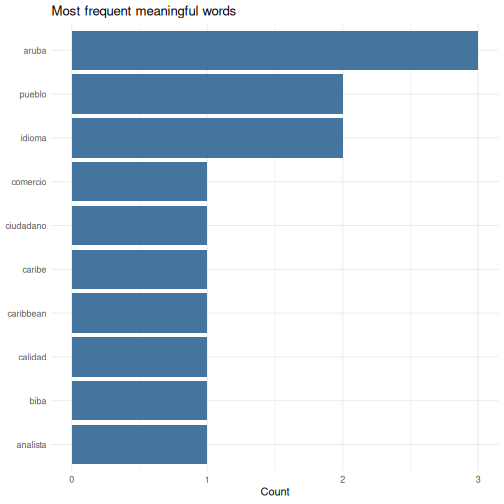
The same pattern works on any text — a column of survey comments, a PDF you have read into R, a folder full of reports. The steps are always: split into words, lowercase, drop stopwords, count, chart.
Actual wordclouds
Bar charts communicate better than wordclouds for most analysis. But
wordclouds are fun to share, and sometimes the right fit for a
presentation slide. The ggwordcloud package plugs straight
into the ggplot2 workflow:
R
install.packages("ggwordcloud")
library(ggwordcloud)

ggplot(word_counts, aes(label = word, size = n)) +
  geom_text_wordcloud() +
  scale_size_area(max_size = 20) +
  theme_minimal()
Install it when you have time after the course — nothing else depends on it.
For a larger Papiamento-language playground, watch for the University
of Aruba’s corpus of governing programmes
(aruba-governing-programmes), which collects the
Programa di Gobernacion texts across coalitions for
research and teaching use.
Building a personal script library
Over time, you will write scripts that solve specific problems: cleaning a particular dataset, running a standard analysis, producing a recurring report. Do not let these scripts disappear. Build a personal library.
Practical tips
Save every analysis as a
.Ror.Rmdfile — never rely on your console history alone.-
Use clear file names that describe what the script does:
01_clean_visitor_data.R
02_quarterly_summary_report.Rmd
03_spending_by_origin_analysis.R
Comment generously. You will forget why you wrote something in three months. Write comments that explain the why, not just the what:
R
# Remove 2020 Q2 because lockdown made the data non-comparable
visitors_clean <- visitors |>
  filter(!(year == 2020 & quarter == "Q2"))
-
Create a project folder structure:
my-project/
├── data/          # Raw data files (never edit these)
├── scripts/       # R scripts for data cleaning and analysis
├── output/        # Generated reports and figures
└── README.txt     # What this project is about
Use RStudio Projects (File > New Project) to keep everything together. RStudio Projects set your working directory automatically and keep your files organized.
Your scripts are your institutional memory
In many small-island government offices, knowledge walks out the door when staff transfer or retire. If your analyses live in commented scripts, the next person can pick up exactly where you left off — even if they only know basic R.
Continued learning
You have covered a lot of ground in this course. Here is where to go next to keep building your skills.
Free books and courses
R for Data Science (2nd edition) by Hadley Wickham, Mine Cetinkaya-Rundel, and Garrett Grolemund. Free online at https://r4ds.hadley.nz. This is the single best next step — it covers everything in this course in more depth, plus much more.
The Carpentries offers free, community-taught workshops on R, Python, Git, and more. Lessons are at https://carpentries.org/community-lessons/.
Posit Cloud (https://posit.cloud) gives you RStudio in your browser with free interactive primers. Good for practicing without installing anything.
Community
DCDC Network — the Dutch Caribbean Data Community is your regional peer network. If you are taking this course, you are already part of it. Use the network to share scripts, ask questions, and collaborate on data projects across the islands.
Posit Community (https://community.rstudio.com) — ask questions, share your work, help others. The best way to learn is to teach.
TidyTuesday — a weekly community data visualization challenge. Every Tuesday, a new dataset is posted and people share their analyses. Great practice and inspiration: https://github.com/rfordatascience/tidytuesday
Between-session practice assignment
The between-session practice assignment is a separate page so it can be handed to you at the end of Day 1 and opened from any device overnight. See the Homework brief under the “For Learners” menu of this site.
Challenge 1: Pull World Bank data and visualize it
Use the WDI package to pull a World Bank indicator for
Aruba and create a basic plot. Follow these steps:
- Load the
WDIandggplot2packages - Use
WDIsearch()to find an indicator that interests you (for example, international tourism arrivals, unemployment, or population) - Use
WDI()to download the data for Aruba (country code"ABW") - Create a line plot showing how the indicator changes over time
- Add a meaningful title and axis labels
Here is an example using international tourism arrivals:
R
library(WDI)
library(ggplot2)

# Search for tourism-related indicators:
WDIsearch("international tourism, number of arrivals")

# Pull international tourism arrivals for Aruba
# Indicator: ST.INT.ARVL = International tourism, number of arrivals
aruba_tourism <- WDI(
  country = "ABW",
  indicator = "ST.INT.ARVL",
  start = 2000,
  end = 2023
)

# Rename the indicator column for clarity
names(aruba_tourism)[names(aruba_tourism) == "ST.INT.ARVL"] <- "arrivals"

# Remove rows where arrivals is missing
aruba_tourism <- aruba_tourism[!is.na(aruba_tourism$arrivals), ]

# Create the plot
ggplot(aruba_tourism, aes(x = year, y = arrivals)) +
  geom_line(linewidth = 1, colour = "#2c7bb6") +
  geom_point(size = 2, colour = "#2c7bb6") +
  scale_y_continuous(labels = scales::comma) +
  labs(
    title = "International Tourism Arrivals to Aruba",
    subtitle = "Source: World Bank World Development Indicators",
    x = "Year",
    y = "Number of Arrivals"
  ) +
  theme_minimal()
Your indicator and chart will look different depending on which indicator you chose — that is fine. The key skills are: searching for an indicator, downloading the data, and visualizing it.
You are ready
You now know how to import data, transform it, visualize it, test hypotheses, and produce automated reports — all in R. That is not everything, but it is a solid foundation. The most important thing now is to use it. The next time you need to analyze data, try doing it in R instead of SPSS. You will be slower at first, but each time it gets easier. And everything you do is reproducible, shareable, and transparent.
Taking your homework further
The four-hour format has no open lab slot, so this section is yours to work through after the course, on the homework brief script you built between the two sessions. If the room is ahead of schedule the instructor may take one or two of these live instead.
Open your homework script and look at three things: what you built, any errors you kept in a comment at the top, and one thing you would still like the script to do. Then pick a target below.
Good extension targets, from lightest to heaviest:
-
Refine the chart. Try a second
geom_*, a different colour mapping, or a facet — re-run, see which version communicates best. -
Add a second summary. Re-run
group_by()/summarise()on a different grouping variable and compare. - Text in your data. If your dataset has a free-text column (survey comments, category labels, document titles), apply the tokenise → stopwords → count → chart pattern from the text-analysis section above.
-
Move into R Markdown. Lift your
.Rfile into a new.Rmd, add a title and two sentences of prose, and knit it. You now have a one-page report.
Bring questions to the instructor and to the person next to you. The goal is that you leave with a script you can run again next week on fresh data.
Before you leave
Please take a few minutes to complete these short surveys. Your feedback helps us improve the course and strengthens the DCDC Network.
Course evaluation — tell us what worked, what didn’t, and what you’d change. This directly shapes future sessions.
Complete the course evaluation survey
DCDC Network onboarding — help us understand your data practices and connect you to the broader network. This feeds into DCDC research on digital competence across the Dutch Caribbean.
Complete the DCDC Network onboarding survey
- R has a large, active community — you are never stuck alone
-
cbsodataRandWDIlet you pull Dutch Caribbean data directly into R - Save your analyses as scripts and build a personal reference library
- The DCDC Network is your regional peer community for continued learning